

If you’ve spent time searching for the “best AI tools” for your WordPress site, you’ve probably noticed a pattern: every list ranks tools by how impressive their marketing copy is, not by how useful they actually are for a small business owner trying to save time on a Tuesday afternoon. You get the same five names in a slightly different order, with suspiciously little information about renewal pricing or real limitations.
At WordPress AI Tools, we’ve tested these tools against real WordPress workflows. This guide is structured around your actual situation, not aspirational use cases. Before recommending anything, let’s be honest about the core problem with most “top AI tools” comparisons.
Why Most “Top AI Tools” Lists Miss the Mark for WordPress Users
Most AI tools roundups rank tools by affiliate commission size, not real-world fit. A tool that pays a 30% recurring commission will appear in position one regardless of whether it’s the right choice for a solo blogger or a WooCommerce store owner. The deeper problem is that no single tool fits all WordPress users, and pretending otherwise wastes your time and money.
There are four real issues that almost no review covers honestly:
1. Introductory pricing vs. renewal pricing. The advertised price is almost never the price you’ll pay after year one. Many AI platforms offer steep launch discounts or annual billing deals that quietly expire.
2. Use-case mismatch. A content marketing agency’s needs are completely different from a solopreneur’s. Recommending Jasper Pro to someone who publishes two blog posts a month is recommending a $69/month tool for a $9/month problem.
3. Hidden add-on costs. Some AI tools have among the most complicated pricing models in the support software space, where a mix of usage-based billing, separate AI add-ons, and strict feature limits makes the real cost much higher than it first appears. This pattern shows up across the AI tools market, not just chatbots.
4. Hallucination risk goes unmentioned. Every AI content tool, without exception, fabricates facts sometimes. Any guide that doesn’t tell you this is selling you something. Always treat AI output as a first draft that needs human review before publishing.
The confusion isn’t usually about complexity. It’s about information overload arriving before you’ve even decided what kind of problem you’re solving. Use this three-step framework to cut through it.
A Decision Framework: Matching AI Tools to Your Actual Needs
Before looking at any specific tool, answer three questions: (1) What specific task am I trying to automate or improve? (2) How many hours per week does that task currently take? (3) What’s the maximum I can justify spending if this tool cuts that time in half? A tool needs to save at least twice its monthly cost in time to justify the expense. Use the table below to map your situation to the right category of tool.
| Your Situation | Primary Need | Tool Category to Prioritize | Budget Range |
|---|---|---|---|
| Publishing 2–4 blog posts/month, solo | Writing speed and idea generation | AI Writing Assistant (entry-level) | $0–$20/mo |
| Running a WooCommerce store with repeat customer questions | 24/7 support without hiring | AI Chatbot for WordPress | $29–$68/mo (with AI features) |
| Content creator scaling to 10+ posts/month | Long-form drafts + SEO optimization | AI Writer + SEO Plugin | $20–$70/mo |
| Agency managing 5+ client WordPress sites | Workflow automation + brand consistency | Team-tier AI Writer + SEO Plugin | $84–$199/yr for SEO; $49–$69/mo for writing |
| Service business needing branded visuals | Blog images without stock photo costs | AI Image Generator | $10–$20/mo |
| Anyone writing emails, proposals, support replies | Polish and tone correction | AI Writing Assistant (Grammarly-style) | $0–$12/mo |
| Developer or technical WordPress user | Custom AI integration and flexibility | API-connected plugin (e.g., AI Engine) | $0 plugin + API usage costs |
Don’t pick a tool based on where you hope to be in year three. Pick one that fits your current actual situation. You can always upgrade.
Top AI Content Creation Tools (And Their Honest Trade-offs)

For most WordPress users, content creation is the first place AI delivers obvious ROI. The time savings on first drafts are real. The limitations, however, are equally real and consistently underreported. Here’s what the honest picture looks like across the main contenders.
ChatGPT (OpenAI)
ChatGPT from OpenAI is not specifically a writing tool. It is a general-purpose AI assistant that happens to be excellent at writing. That distinction matters. ChatGPT adapts to almost any prompt, which makes it powerful for brainstorming, outlining, drafting, and editing across formats. ChatGPT Plus delivers exceptional value at $20/month for general long-form writing.
Best for: WordPress users who publish across multiple content formats and want one flexible tool rather than a specialized one.
Pricing: Free tier available with limited access. ChatGPT Plus is $20/month and includes access to the most capable models plus image generation via DALL-E. No hidden add-ons at this tier.
The honest trade-off: ChatGPT’s specific features for structured content creation, like SEO optimization or long-form blog post generation, are less defined when compared to specialized tools. It won’t automatically optimize for your focus keyword or check internal linking. You’re responsible for directing the output quality with good prompts, which has a learning curve.
Jasper AI
Jasper is the enterprise-grade option. It’s purpose-built for marketing content at volume, with brand voice training, structured templates, and team workflow features. It is best for marketing teams, agencies, and businesses producing sales copy, email sequences, and SEO content, and offers 50+ pre-built templates including headlines, long-form frameworks, and social ads.
Pricing: The Pro plan runs approximately $69/month per user (or ~$59/month billed annually) for the full feature set including unlimited words, Jasper Chat, templates, and Jasper Art image generation. A Creator plan at $49/month is available but has limited features.
The honest trade-off: Jasper’s underlying AI quality is similar to ChatGPT. The premium price is paying for the workflow features, brand voice training, and marketing structure, not meaningfully better writing. For a solo creator or small team that does not need these features, the premium is hard to justify. If you publish fewer than eight pieces of content per month, the math rarely works out.
Copy.ai
Copy.ai focuses on quick content creation with ready-to-use templates ideal for short-form marketing, social media posts, emails, and product descriptions. It’s popular among startups, sales teams, and entrepreneurs who want fast drafts that can be edited rather than full long-form essays.
Pricing: Copy.ai offers a free plan with limited runs per month. Paid plans scale from a solo tier upward. Jasper is known for its powerful long-form content generation and robust branding tools, while Copy.ai offers an accessible platform with a strong free plan and quick-hitting copy templates.
The honest trade-off: Copy.ai occupies a middle position: more structured than ChatGPT, less expensive and comprehensive than Jasper. It focuses on generating marketing copy quickly rather than long-form content or deep brand integration. If you primarily need blog posts rather than sales copy, it can feel limiting.
Rytr
Rytr is the most budget-friendly serious option for WordPress bloggers and small business owners who need clean drafts without a steep monthly commitment. It’s a solid choice for bloggers, social media managers, small business owners, and creators who need an easy-to-use, budget-friendly AI writing tool for quick posts, captions, product descriptions, and idea generation.
Pricing: Rytr offers a free plan, while premium plans start at around $9 per month, making it one of the most affordable AI writing assistants available.
The honest trade-off: While Rytr isn’t built specifically for deep SEO optimization or advanced AI workflows, it’s a great option for creators who want clean drafts and short-form copy without spending money upfront. Don’t expect it to replace a specialized SEO content workflow.
If you’re unsure which of these fits your publishing volume and budget, our team at WordPress AI Tools can walk through the numbers with you before you commit to a subscription.
AI Image Generation Tools Worth Your Investment
Stock photo libraries are expensive and generic. AI image generation is now a legitimate alternative for WordPress blog headers, social media assets, and product mockups. The key is knowing which tool fits your workflow and your risk tolerance around commercial use rights.
Midjourney: Best for Visual Quality
Midjourney is widely regarded as the benchmark for artistic quality in the AI art world, producing richly detailed, cinematic images. It now offers a streamlined web interface with sliders for stylization, size, and “weirdness,” making it easier for creators to guide the model.
Pricing: Starting at $10/month. It has four subscription levels with a 20% discount for annual billing. Pricing ranges from $10 to $120 per month and defines how much GPU time you can consume.
The honest trade-off: Artists rely on Midjourney for fantasy landscapes, stylized portraits, and polished artwork, while marketers value its dramatic visuals for ads and campaigns. However, custom model training is not available and there is no free tier. If you need to test before committing, you cannot.
DALL-E 3 (via ChatGPT): Best for Prompt Accuracy
DALL-E 3 is best for images that match exactly what you described. It offers unmatched prompt adherence and the best text rendering inside images. For WordPress users who need to generate feature images that closely match specific content, this is the most reliable option.
Pricing: Bundled into ChatGPT Plus at $20/month, which you may already be paying for content work. No separate subscription required.
The honest trade-off: Midjourney produces more artistic, gallery-quality images, while DALL-E 3 is better for precise, literal interpretations and beginner-friendly use. If visual drama matters more than literal accuracy, DALL-E 3 may disappoint.
Adobe Firefly: Best for Commercial Safety
Adobe Firefly is the only major AI image generator that provides explicit commercial indemnification. Adobe trained Firefly exclusively on Adobe Stock images, openly licensed content, and public domain material, not scraped web images. For businesses using AI-generated images in client work, advertising, or branded content, this matters significantly.
Pricing: Free tier available with watermarked images. Paid plans start at about $9.99/month or bundled with Creative Cloud.
The honest trade-off: Adobe Firefly Image 3 fits right into the Adobe workflow and offers legally secure use for commercial projects. If you’re not already in the Adobe ecosystem, onboarding costs time. Pure aesthetic output also trails Midjourney.
AI Chatbots and Customer Support Tools for WordPress Sites

A good chatbot plugin handles repetitive customer questions around the clock, freeing you from support inbox debt. The problem is that chatbot pricing is notoriously complex, and the advertised entry price rarely reflects what you’ll actually pay once you need real AI-powered responses, not just rule-based FAQ automation.
Tidio: Popular, but Read the Fine Print
Tidio is a customer support platform that combines live chat, chatbots, and helpdesk tools under one roof. It’s designed to help businesses engage customers across their website, Facebook, Instagram, email, and WhatsApp. The platform is especially popular among small businesses and e-commerce stores, thanks to its easy setup and integrations with tools like Shopify, WordPress, and Zapier.
Pricing (the full picture): Four main plans: Starter ($29/mo), Growth ($59–$349/mo), Plus ($749/mo), and Premium (from $2,999/mo). Here’s the catch: Lyro AI and Flows are billed separately, starting at $39/mo and $29/mo respectively, often doubling the total cost. On the free plan, you get a one-time 50 AI conversations total, not per month. After that, it’s done unless you pay.
The honest trade-off: Tidio has one of the most complicated pricing models in the support software space. The mix of conversation-based billing, separate AI add-ons, and strict limits can make the real cost much higher than it first appears. Run through your expected monthly chat volume before signing up. A small WooCommerce store handling 150 AI conversations per month will quickly find themselves paying well above the entry price.
AI Engine: The WordPress-Native Option for Developers
AI Engine is one of the most versatile and customizable WordPress AI plugins available. Instead of being just a content generator, it acts as a complete AI toolkit inside your WordPress dashboard. It handles content creation, chatbots, image generation, and form automation from a single plugin.
The honest trade-off: Because AI Engine tries to do everything (content writing, image generation, chatbots, SEO), it can feel overwhelming. You’re paying for a Swiss Army knife when you might just need a knife. For users who want a dedicated, specialized chatbot experience for serious customer support needs, AI Engine’s chatbot falls short of what purpose-built options offer.
Best for: Content creators and bloggers who want multiple AI tools in one package. If you’re already planning to use AI for writing and you want a basic chatbot as a nice-to-have, this is a good choice.
MxChat: The Lifetime Pricing Alternative
MxChat supports multiple AI models and leverages Retrieval-Augmented Generation (RAG) to ensure every response is precise, context-aware, and drawn directly from your own knowledge base. This eliminates generic answers and provides customers with genuinely helpful information, 24/7. With features like unlimited chatbot creation and a lifetime pricing model, MxChat offers a scalable and cost-effective way to reduce the workload on human agents and improve response times.
The honest trade-off: Lifetime pricing models in the SaaS space always require a closer look. Consider the company’s track record and what “lifetime” actually guarantees in the terms of service before committing.
AI-Powered SEO and Productivity Tools
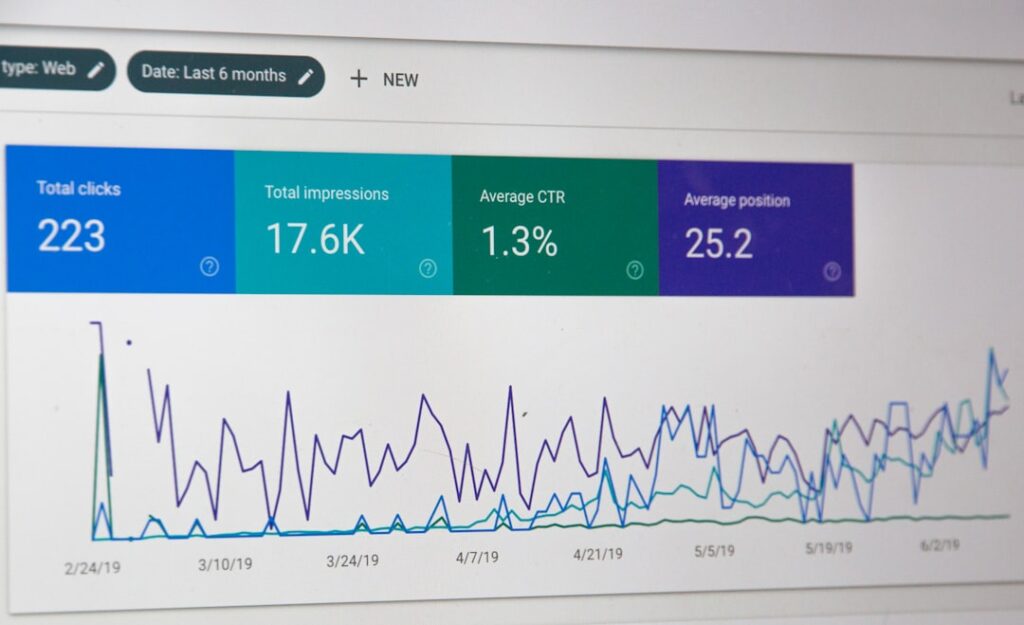
SEO is where AI tools have the most direct, measurable impact on WordPress sites. Getting this category right also means the biggest difference in organic traffic. The good news: the best SEO tool for most WordPress users is already free.
Rank Math vs. Yoast SEO: The Real Comparison
When comparing Yoast and Rank Math SEO, most users and experts lean toward Rank Math as the winner because of its richer free feature set, faster performance, built-in AI tools, and lower pricing. But the picture is more nuanced than that.
Rank Math free tier: Rank Math offers 5 focus keywords, schema markup, redirect manager, 404 monitor, local SEO, and internal linking suggestions completely free. Those are features Yoast reserves for paid plans. Rank Math Pro is billed at $84/year, among the most affordable premium WordPress SEO plugin options.
Yoast SEO: With over 13 million active installations, it remains the most widely used SEO plugin. Its traffic-light scoring system provides instant visual feedback on both SEO optimization and content readability, making it genuinely intuitive for non-technical users. Yoast SEO Premium costs $118.80 per year for a single site and adds five focus keywords per post, internal linking suggestions, a redirect manager, 404 monitoring, and access to Yoast SEO Academy courses.
The honest trade-off for agencies: Rank Math Pro gives unlimited sites for $107.88/year, while a single Yoast Premium license costs $128/year. For agencies or anyone with multiple sites, Rank Math’s pricing is exponentially better value. For beginners who want the simplest possible interface, Yoast still remains the top choice for complete beginners who want the simplest interface and the most advanced readability analysis.
Grammarly: The Underrated WordPress Productivity Tool
Grammarly catches grammar mistakes, suggests clarity improvements, and adjusts tone for professional communication. The AI goes beyond spell-check to offer full-sentence rewrites and professional tone adjustments. Browser extensions and desktop apps mean Grammarly works wherever you write: email clients, Google Docs, Slack, or social media.
Pricing: Free covers basic grammar and spelling. Pro at $12/month (annual) or $30/month (monthly) adds advanced tone recommendations, full-sentence rewrites, and plagiarism detection. Business starts at $15/user/month (annual).
The honest trade-off: Grammarly improves writing you have already produced. It is not a content generator. The right choice depends on where your writing actually happens. Switching context to use an AI tool costs time, so match the tool to the environment, not the other way around.
Notion AI: Useful If You Already Live in Notion
If your editorial calendar, content briefs, and meeting notes already live in Notion, adding AI to that workflow is a natural fit. The writing assistant produces competent first drafts that save 15–30 minutes per document. However, pricing changed significantly in 2025.
Pricing (current): The free plan includes only a limited trial of roughly 20 AI responses. The Plus plan at $10/user/month (annually) also includes only a limited AI trial. The Business plan at $20/user/month is the minimum plan for teams that want to use AI seriously, and includes full Notion AI access with Notion Agent, AI Meeting Notes, and multi-model AI.
The honest trade-off: Notion AI lives inside Notion pages, databases, and wikis. If your team runs on Notion, the AI is already there. If you don’t use Notion for anything else, this is not the tool to adopt for AI writing alone. The cost per user doesn’t justify it.
The Real Cost of Ownership: What Most Reviews Won’t Tell You

The sticker price of an AI tool is rarely the cost you’ll actually pay. This section is the one most comparison guides skip entirely, so here it is plainly.
The Add-on Problem
Many AI platforms use a base-plus-add-on pricing structure that looks affordable at first glance. Many AI tools look affordable at first, but hidden costs like usage limits, add-ons, or per-seat fees often make the total spend unpredictable. Chatbot platforms are the worst offenders. Image generation tools that cap monthly credits can also create surprise costs if you’re publishing visual content at any volume.
The Learning Curve Tax
Consider total cost of ownership beyond subscription fees. Implementation typically requires 10–15% of tool cost for training and workflow development. That percentage translates to real time. A $69/month tool that takes 40 hours to integrate properly into your content workflow has an effective first-month cost several times higher than the subscription price.
The ROI Timeline Gap
Long-form content teams report ROI realization within 12–18 months through improved productivity and content quality metrics. That’s not a criticism of AI tools; it’s realistic. Don’t expect an AI writing tool to pay for itself in month one. If you’re adopting AI to improve content output over time, budget for a learning period of 60–90 days before measuring ROI.
The “Free Plan” Ceiling
Free plans exist to get you dependent on a platform, then present an upgrade decision when you hit the ceiling. This is most aggressive in chatbot tools: the 50-conversation limit on free chatbot plans is the killer. Most websites with decent traffic hit this within the first week. It’s a trial, not a long-term solution. Test with free plans, but build your real cost estimates around the tier you’ll actually need to run at your current traffic level.
The Hallucination Risk
Every AI content tool, from ChatGPT to Jasper to Copy.ai, will occasionally generate confident-sounding false information. This is not a bug that will be patched away. It’s an architectural reality. The writing assistant is not a replacement for human writing. It produces competent first drafts that save time, but every output needs human review, especially for factual accuracy. Budget for that editing time in your workflow calculations.
Frequently Asked Questions About AI Tools for WordPress
Here are the questions our readers ask most frequently before choosing an AI tool for their WordPress site.
Your Next Step: Finding the Right AI Tool for Your Situation
Your first AI tool doesn’t need to be perfect. It needs to exist and actually get used. If you’re a solo WordPress publisher, start with ChatGPT Plus at $20/month and Rank Math’s free plan. That combination costs less than a single lunch and covers content drafting plus on-page SEO. If you’re running a WooCommerce store, add a chatbot plan only after you’ve confirmed your monthly conversation volume, so you can predict the real cost.
The right tool is the one that fits your current budget, your current publishing volume, and your current technical comfort level. Not the one with the most impressive demo video.
If you’re still not sure which combination makes sense for your specific WordPress setup, contact WordPress AI Tools today for personalized guidance tailored to your situation. No pressure, no generic advice, and no recommendations based on affiliate payout size. Just a straight answer about what actually fits your workflow.
Frequently Asked Questions
Do I need to install a separate plugin to use AI tools on my WordPress site?
Not necessarily. Many AI tools like ChatGPT, Jasper, and Grammarly work outside WordPress and let you paste content into your editor. WordPress-native options like Rank Math (for SEO) and AI Engine (for content and chatbots) work directly inside your dashboard. The right approach depends on your workflow: if you draft content outside WordPress anyway, a standalone tool works fine. If you want AI features inside the editor without context-switching, a native plugin makes more sense.
Will Google penalize AI-generated content on my WordPress site?
Google’s guidance focuses on content quality, not how content is produced. AI-generated content that is accurate, helpful, and genuinely written for readers is treated the same as human-written content. The risk is publishing unedited AI output that is thin, repetitive, or factually wrong — which can harm rankings regardless of how it was written. Always treat AI output as a first draft requiring human review, fact-checking, and editing before publishing.
What’s the most cost-effective AI tool setup for a beginner WordPress site owner?
For most beginners, the best starting combination is ChatGPT’s free tier (for drafts and brainstorming), Rank Math’s free plugin (for on-page SEO), and Grammarly’s free tier (for proofreading). This zero-cost setup covers the three most impactful use cases without any subscription risk. Once you’re publishing consistently and can measure time savings, upgrading to ChatGPT Plus at $20/month is the single highest-ROI step for most WordPress content creators.
What are the biggest hidden costs in AI chatbot tools for WordPress?
The most common hidden costs are: (1) AI conversation limits billed separately from the base plan — some platforms charge $39/month or more as an add-on just to enable AI-powered responses; (2) per-seat charges that multiply with team size; (3) visitor-based billing on automation flows that spikes unpredictably with traffic; and (4) overage charges when you exceed monthly conversation limits. Always calculate your expected monthly chat volume before choosing a chatbot plan, and read the add-on pricing before signing up.
Is Adobe Firefly safe for commercial use on my WordPress site?
Adobe Firefly is currently the only major AI image generator that explicitly indemnifies commercial users against copyright claims. Adobe trained Firefly exclusively on licensed and public domain content, not scraped web images. This makes it the safest option for agencies, businesses producing client work, or anyone using AI images in paid advertising or branded materials. Midjourney and DALL-E do not provide this commercial indemnification.

