

If you are building a website for your business, blog, or portfolio, one of the first decisions you will face is choosing a web hosting provider. At WordPress AI Tools, we help people navigate these foundational choices because every smart website strategy starts with reliable infrastructure. The honest reality is that web hosting can feel overwhelming, especially when providers bombard you with jargon like “VPS,” “SSL,” and “CDN.” This guide cuts through the noise and explains everything in simple, practical terms so you can make an informed decision without second-guessing yourself.
Web Hosting Basics: A Simple Introduction
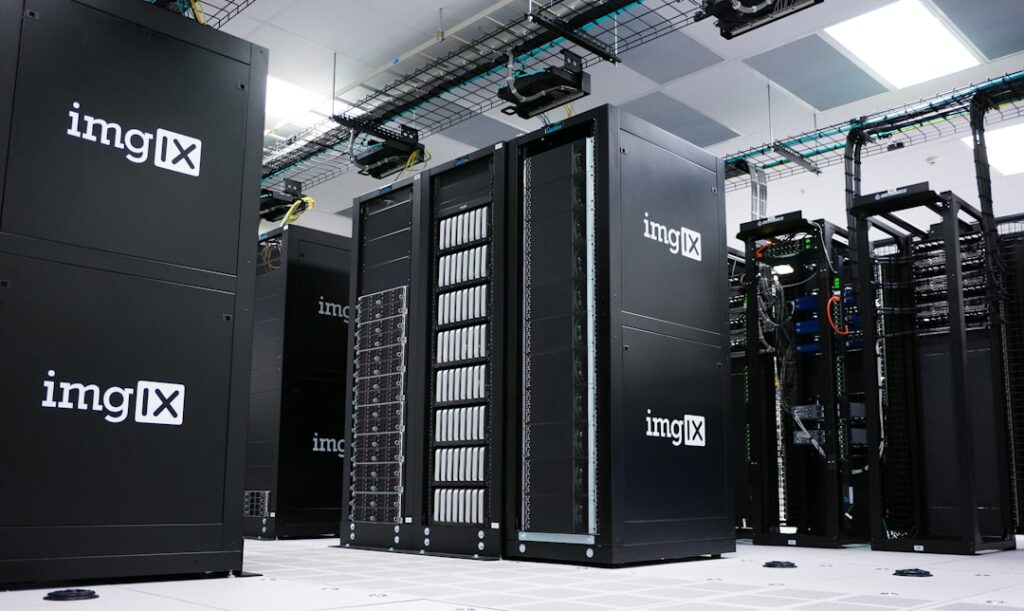
Think of web hosting as renting space for your website to live on the internet. Your website is made up of files: text, images, code, and databases. A web hosting provider stores those files on powerful computers called servers and delivers them to anyone who types your website address into a browser. Without hosting, your website simply would not exist online.
Here is a useful analogy: if your domain name (like yourbusiness.com) is your street address, web hosting is the physical building at that address where all your website content is stored. You need both a domain name and a hosting account for a working website. Most hosting providers offer domain registration as part of their plans or as an add-on, so you can manage everything in one place.
When someone visits your site, their browser sends a request to the server where your files are hosted. The server processes that request and sends back everything needed to display the page. This process happens in milliseconds and directly impacts your website’s load speed, user experience, and search engine rankings. Slow hosting means slow pages, and slow pages drive visitors away. According to industry research, almost half of internet users expect websites to load within two seconds.
A practical note on terminology: you will encounter several key terms as you evaluate hosting providers. Uptime refers to the percentage of time your site is accessible. Aim for providers that guarantee at least 99.9% uptime, which still translates to roughly 9 hours of potential downtime per year. Bandwidth is the amount of data that can be transferred between your site and visitors in a given period. Storage is the physical space on the server for your files. And an SSL certificate encrypts data between your site and visitors, which is essential for both security and SEO. Most reputable providers now include free SSL certificates with their hosting plans.
Types of Web Hosting Services
Not all hosting is created equal. The type you choose depends on your website’s size, expected traffic, technical comfort level, and budget. Here is a breakdown of the most common hosting types, explained without the jargon.
Shared Hosting
Shared hosting is the most affordable and popular type of web hosting. Think of it like renting an apartment in a building: you share the building’s resources (electricity, water, plumbing) with other tenants. Similarly, your website shares server resources like CPU, RAM, and storage with other websites on the same server. This keeps costs low but means performance can dip during high-traffic periods if another site on the server is consuming heavy resources. Shared hosting is a great fit for personal blogs, small business websites, portfolios, and sites with low to moderate traffic.
VPS (Virtual Private Server) Hosting
VPS hosting divides a physical server into smaller, independent virtual servers. Each virtual server gets its own dedicated resources, so what happens on another VPS on the same physical machine will not affect your site. This gives you better performance, more customization options, and greater control over your environment compared to shared hosting. VPS is ideal for growing websites, ecommerce stores, and web applications that have outgrown shared hosting limits. Be realistic about what counts as “needing VPS”: if your shared plan is performing well and your traffic is still modest, you probably do not need to upgrade yet.
Dedicated Hosting
With dedicated hosting, you get an entire physical server exclusively for your website. You have full control over the server’s hardware, software, and configuration. This is the most powerful and expensive hosting option, designed for high-traffic enterprise websites, complex applications, financial platforms, and large data projects. Most small businesses and bloggers will never need dedicated hosting, but it is important to know it exists as a growth path.
Cloud Hosting
Cloud hosting uses a network of interconnected servers rather than a single machine. This approach ensures high uptime because if one server fails, others in the network pick up the load. Cloud hosting also allows you to scale resources up or down depending on traffic demands, making it flexible for businesses with unpredictable traffic patterns. The tradeoff is that pricing can be less predictable compared to traditional fixed-rate plans. The three major cloud infrastructure providers (AWS, Microsoft Azure, and Google Cloud) together hold approximately 80% of the global cloud infrastructure market.
Managed WordPress Hosting
Given that WordPress powers approximately 43% of all websites globally, many hosting companies offer plans specifically optimized for WordPress. Managed WordPress hosting handles the technical maintenance for you: automatic updates, enhanced security, server-level caching, and WordPress-specific support. This is a strong option if you are running a WordPress site and want to focus on content and business rather than server management. If you are exploring how AI tools can further streamline your WordPress workflow, our guide to the best AI tools in 2026 covers tools that integrate directly with WordPress sites.
Comparing Popular Web Hosting Options
The following table provides a practical comparison of the main hosting types. Use this as a starting point to match your website’s needs with the right hosting category. Keep in mind that prices vary by provider and plan term, and introductory rates often increase significantly upon renewal.
| Hosting Type | Typical Monthly Cost | Best For | Performance Level | Technical Skill Needed |
|---|---|---|---|---|
| Shared Hosting | $2 – $15 (intro); $8 – $25+ (renewal) | Blogs, small business sites, portfolios | Basic to moderate | Low (beginner-friendly) |
| VPS Hosting | $10 – $100 | Growing sites, ecommerce, web apps | Moderate to high | Moderate (some technical knowledge helpful) |
| Cloud Hosting | $10 – $200+ | Scalable businesses, variable traffic | High | Moderate |
| Dedicated Hosting | $80 – $500+ | High-traffic enterprise sites, complex apps | Highest | High (server management expertise) |
| Managed WordPress Hosting | $3 – $50+ (varies widely by provider) | WordPress sites of all sizes | Moderate to high | Low (provider handles technical tasks) |
A practical note on pricing: many providers use promotional introductory pricing to attract new customers. A plan advertised at $2.99 per month might renew at $10 to $15 per month after the initial term. Always check the renewal rate before committing, and factor that into your long-term budget. The most important comparison is not the starting price but what the plan costs over time and what is included at renewal.
Essential Web Hosting Features and Specifications

Once you have narrowed down the type of hosting you need, it is time to evaluate specific features. Not every feature matters equally to every site owner, but these are the non-negotiables and nice-to-haves that separate good hosting from hosting that will cost you time, money, or visitors down the road.
Uptime Guarantee
This is arguably the most critical specification. If your site is down, nothing else matters. Look for providers that guarantee at least 99.9% uptime. While 99.9% sounds nearly perfect, it still allows for about 9 hours of downtime annually. Some premium providers offer 99.99% uptime guarantees, which reduces potential downtime to roughly 53 minutes per year. Check whether the provider offers service credits or compensation if they fail to meet their uptime commitment.
SSL Certificates
An SSL certificate encrypts the connection between your server and your visitors’ browsers. It is what puts the padlock icon and “https” in your website’s address bar. HTTPS is now used by approximately 88% of all websites, and search engines like Google use it as a ranking factor. Most reputable hosting providers include a basic SSL certificate for free. If you run an ecommerce site handling payment data, you may need an extended validation certificate, which can cost extra.
Automatic Backups
Things go wrong: plugins break, updates fail, or security incidents happen. Automatic daily backups ensure you can restore your website quickly without losing data. Some hosts include this feature for free, while others charge an additional fee. Always verify the backup frequency (daily is ideal) and how easy it is to restore from a backup.
SSD Storage
Modern hosting plans should use Solid-State Drives (SSDs), which are dramatically faster than traditional Hard Disk Drives (HDDs). SSDs reduce page load times and improve overall server responsiveness. Some providers now offer NVMe SSD storage, which is even faster. If a provider is still advertising HDD storage in 2026, consider that a red flag.
Customer Support
When something goes wrong at 2 AM on a Saturday, you need support that actually responds. Look for 24/7 support via live chat, phone, or ticket system. The quality of support matters as much as availability. Before committing, test the provider’s pre-sales support with a question. How quickly do they respond? Do they give a helpful, specific answer, or a generic one? This is often the best indicator of long-term service quality.
Scalability
Your website’s needs will change over time. Choose a provider that makes it easy to upgrade from shared to VPS, or from VPS to dedicated, without major disruptions or painful migrations. Scalability means your hosting can grow with your business rather than holding it back.
Content Delivery Network (CDN)
A CDN stores copies of your website on servers distributed around the world. When a visitor accesses your site, the CDN serves the content from the server closest to them, which reduces load times. Many hosting providers now include CDN integration (often through Cloudflare) as part of their plans. For websites with a global audience, this is a significant performance boost.
How Much Does Web Hosting Cost?

Web hosting costs vary widely depending on the type of hosting, the provider, the plan term, and the features included. Here is an honest breakdown of what you should expect to pay, including the hidden costs that catch many beginners off guard.
Baseline Hosting Costs
Shared hosting is the most budget-friendly option, typically costing between $2 and $15 per month at introductory rates, with renewal prices commonly increasing to $8 to $25 or more per month. VPS hosting ranges from approximately $10 to $100 per month depending on the allocated CPU, RAM, and storage. Cloud hosting generally falls between $10 and $200 or more per month, with costs scaling based on usage. Dedicated hosting starts at around $80 per month and can exceed $500 per month for high-specification configurations.
Hidden and Additional Costs to Watch For
The sticker price is rarely the whole story. Here are common additional costs that can quietly inflate your total hosting budget:
Domain registration: Many providers offer a free domain for the first year, but annual renewals typically cost between $10 and $20. SSL certificates: Basic SSL is usually free, but advanced or extended validation certificates can cost up to $200 or more per year. Email hosting: Professional email addresses (like you@yourdomain.com) may require a paid add-on, typically $1 to $5 per mailbox per month. Backup services: While basic backups might be included, comprehensive automated backup solutions sometimes carry a premium. Migration services: If you are moving from another host, migration fees can range from $25 to $200 depending on complexity, though some providers offer free migrations. Premium themes and plugins: Particularly relevant for WordPress users, premium design themes and plugin tools can add $30 to $100 or more per year to your costs.
How to Think About ROI
At WordPress AI Tools, we always recommend thinking about hosting as an investment, not just an expense. A $5 per month shared hosting plan that keeps your business site online, fast, and secure can easily justify its cost if it supports even one or two customer conversions per month. On the other hand, saving $2 per month on a bargain host that suffers frequent downtime or slow speeds can cost you far more in lost visitors and damaged credibility. The teams and businesses that get the most value build a systematic strategy around their hosting choice rather than simply picking the cheapest option. If you are interested in calculating the return on your broader technology investments, our complete guide to selecting and measuring AI tools includes frameworks for evaluating ROI that apply beyond just AI.
Frequently Asked Questions
What is the difference between a domain name and web hosting?
A domain name is your website’s address on the internet (like yourbusiness.com). Web hosting is the actual space on a server where your website’s files are stored and served to visitors. You need both to have a working website. Think of the domain as your street address and the hosting as the building where everything lives. Many providers bundle domain registration with hosting plans, but they are technically separate services.
Can I switch hosting providers after I have already started?
Yes. Migrating your website to a different hosting provider is common, and many hosts offer free migration assistance to make the process smoother. However, migrations can temporarily affect your site, so plan carefully. Look for a provider that offers a money-back guarantee (typically 30 days) so you can test the new hosting environment before fully committing. Back up your site completely before initiating any migration.
Is free web hosting a good option?
Free hosting services exist, but they come with significant limitations. Free plans often display the provider’s advertisements on your site, restrict your bandwidth and storage, offer no custom domain, lack essential security features, and provide little to no customer support. For a personal experiment or learning project, free hosting can work in a pinch. For any business or professional website, even a budget shared hosting plan at $3 to $5 per month is a far more reliable and professional choice.
How do I know when it is time to upgrade my hosting plan?
Watch for these signs: your site consistently loads slowly despite optimization efforts, you experience frequent downtime, your hosting control panel shows resource usage regularly hitting its limits, or your traffic has grown significantly beyond what your current plan supports. If you are on shared hosting and experiencing these issues, upgrading to VPS or managed hosting is usually the logical next step.
Do I need managed WordPress hosting, or is regular shared hosting fine for WordPress?
WordPress runs perfectly well on standard shared hosting, especially for smaller sites. Managed WordPress hosting adds conveniences like automatic WordPress updates, enhanced security, server-level caching, and WordPress-specific support. If you want a hands-off technical experience and your budget allows it, managed WordPress hosting saves time and reduces headaches. If you are comfortable handling basic maintenance yourself, standard shared hosting can be a more cost-effective starting point. Our practical guide to AI apps for every workflow explores tools that can help automate some of the maintenance tasks that managed hosting would otherwise handle.
Next Steps: Getting Your Website Online

Choosing a web hosting provider does not have to be an agonizing decision. Start by honestly assessing your needs: How much traffic do you expect? What is your budget, including renewal costs? How much technical maintenance are you willing to handle yourself? For most beginners launching a blog, small business site, or portfolio, shared hosting or managed WordPress hosting is the right starting point. You can always upgrade as your site grows.
Here is a quick action plan to get moving:
Step 1: Define your website type and expected traffic level. Step 2: Set a realistic monthly budget that accounts for renewal pricing, not just introductory offers. Step 3: Prioritize providers with at least 99.9% uptime, free SSL, automatic backups, and responsive 24/7 support. Step 4: Test the provider’s customer support before you buy. Step 5: Take advantage of money-back guarantees to evaluate performance with your actual site before making a long-term commitment.
At WordPress AI Tools, we believe that a strong website starts with a strong foundation, and hosting is that foundation. Once your hosting is in place, you can layer on the tools, plugins, and strategies that help you grow. Explore our in-depth guides and reviews to find the tools that fit your specific workflow and budget, and start building with confidence.

